Wednesday, October 16, 2013
Making Cupcake Toppers
Hello Everyone and welcome to another Copic Oz Tutorial! Today I'm going to use Flourishes new Pinwheels and Popsicles stamp set to create Cupcake Toppers!! Such fab projects to add a splash of fun to any celebration!!
Firstly I've started by stamping the ice-cream in Memento Tuxedo Black onto X-press It Blending Card and laid down a base colour of E50.
Then add some shading with E51.
Deepen the shading with E53 and lightly blend with E51.
I like a lot of contrast, so I've deepened the shading even more with E57, once again blend with E53 and E51.
I've made this a strawberry ice-cream and laid down a base of RV00.
Add some shading with RV02 and lightly blend with RV00.
Deepen the shading with RV04 and lightly blend with RV02 and RV00.
For your yummy cherry on top, start with a base of R32.
Add shading with R35.
Deepen the shading with R37.
For more contrast add some R39 and lightly blend with R37, R35 and R32! I don't blend my reds until I've laid down all the colours. Reds have a tendency to bleed, so I find it's better to leave the blending until the end. If you do find the colours start to bleed, at least with this image I'm going to cut it out for the finished project! ;-)
So now that we have a fabulously sweet strawberry ice-cream, what are we going to do with it?? Cut it out, grab a toothpick and a couple of notched tags the same size!
Stamp the sentiment from Flourishes' Pinwheels and Popsicles onto one and the glue the two tags together with the toothpick in between. A strong glue like X-press It Clear Gel Glue is perfect! Fussy cut the ice-cream you've coloured and pop it up on X-press It Foam Tape!
Want to step it up a little? Why not take a Popstick, create a rosette, a notched tag and a couple of decorative circle shapes!
Glue the popstick and circle to the back of the rosette. Attach the decorative circles together, fussy cut the ice-cream and stamp the sentiment onto the notched tag and assemble!
Why give your party that added extra fun by creating your own fabulous cupcake toppers and wow your guests (not to mention having a lot of fun preparing as well)!
I hope you've enjoyed today's tutorial, thanks for visiting and happy colouring!!
Pin It
Wednesday, October 2, 2013
Creating your own Stencils and Masks, using Acetate, Lace and Mask It
We are going to have a play - no stress and practically no experience required to be able to create along with today's post. Today I will be showing you how to use masks and stencils with your Copic Markers and Copic Airbrush to create stunning backgrounds for cards or pages. Once again I will be creating in my gorgeous X-Press It Blending Journal - but you can also use X-Press It Blending Card.
To play along you will need:
- Clear Acetate sheets
- X-Press It Blending Journal or X-Press It Blending Card
- Copic Sketch markers
- Copic Colourless Blender n in a small misting bottle
- X-Press It Mask It
- Copic Airbrush System (either travel or compressor unit)
- lace or doilies
Before I go on - let me clear up something that is often a bit confusing - what's the difference between a Mask and a Stencil?
Wikipedia defines a Stencil as 'a thin sheet of material, such as paper, plastic, or metal, with letters or a design cut from it, used to produce the letters or design on an underlying surface by applying pigment through the cut-out holes in the material. The key advantage of a stencil is that it can be reused to repeatedly and rapidly produce the same letters or design.'
EG: using a 'hello' stencil would result in colouring the word 'hello' onto your project as shown below
A Mask is the reverse of a stencil and is defined as 'a covering to hide or guard .'
EG: using a 'hello' mask would result in colouring the SPACE around the word 'hello' on your project, you would get a white hello as shown below.
Using Acetate and X-Press It Mask It I have used metal scrapbooking dies and a die cutting machine to cut some images and shapes to create masks and stencils to use with my Copic Markers and Copic Airbrush.
I have started by air brushing a few co-ordinating colours onto a page in my X-Press It Blending journal, I like to start with some colour on the page so that the images are not too stark.
| E15, BG15 & V15 |
Lay Mask It mask over background (sticky side towards paper) and press down to ensure good contact with the card. Using the Copic Airbrush System, spray with V15. When you remove the mask you will notice that the edges are clean and crisp - a hard edge.
Depending on the effect you are after you may find one of these products more suitable than the other when airbrushing with your Copics. Mask It = crisp image, Acetate = soft edge to image
Things to note:
Acetate is reusable and when used exclusively with Copic inks should last quite a while,
Mask It is more fragile and may only last for a few images before it tears.
Of course you can use both of these products together on your Copic projects combining the soft and hard edges and overlaying and overlapping stencils and masks for wonderful effects like this.
Now masks and stencils are not only die cuts made from Acetate, plastic or Mask It, you can also use household objects or even fabrics! You can get stunning effects by using lace - even nanna's old doilies hiding in the cupboard, can get a second lease on life with this technique!
On this page I have begun by laying down a single colour over the background.
| Background of BG15 |
Lay lace over coloured page and using sticky tape secure in place (this will result in a crisper image). Using Copic Airbrush spray BG49 through the lace onto your page.
| Add BG49 |
Leave lace in place and spray N7 over the edges of the page through the lace - this will add a darker border.
Remove the lace and your background will look like this.
As an added bonus you now have this stunning piece of coloured lace you can use on other projects.
For something different add a brown into the mix to contrast with the pastel colours.
The N7 is on the top and the E15 is on the bottom to show you the difference between adding in a grey and adding in a brown - I think both look gorgeous.
Don't forget you can use the Copic Colourless Blender to add interest by laying a piece of lace over the background and spritzing the Colorless Blender over the top - this will result in an interesting effect essentially creating a bleached halo around the lace.
I've gone and added a little lace work to my masked page and a few masks and stencils to my lace page - to create a seamless 2 page spread in my Blending Journal. When combining both ideas (masks, stencils from acetate and Mask It & using Lace) you can create stunning backgrounds like this - imagine this as the background for your card, scrapbook layout or journal page!
And surprisingly using the airbrush uses significantly less ink than colouring the same area with your actual markers.
You can see all of the individual elements combine to create gorgeous, yet distinct coordinating pages.
Both pages use the following Copic colours.
| Colorless Blender, V15, BG15, E15, BG49 & N7 |
I hope that this has given you a few ideas about how to use Acetate, Mask It and even lace to create stunning backgrounds using your Copic Markers.
Kate
Wednesday, September 18, 2013
Glamorous Skin and Hair!
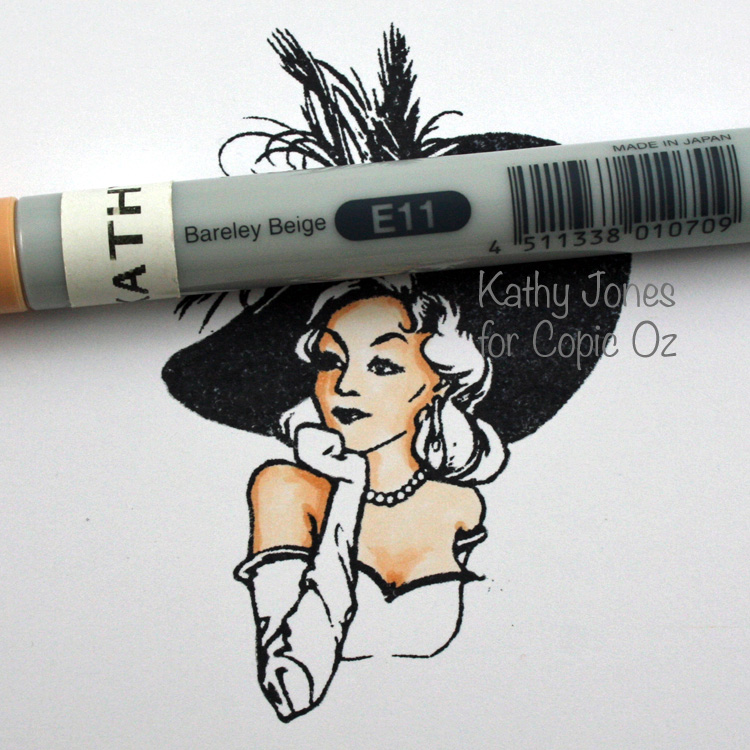
Hello Everyone and welcome back to another Copic Oz Tutorial! Today I'm using this GORGEOUS new Flourishes set called Glamour Girls which is perfect for practicing your skin and hair techniques! Join me as I walk through step by step how to colour this fabulous girl with your Copic Markers!
Stamp your image in Memento Tuxedo Black onto X-press It Blending Card and then lay down a base colour of E000 for her skin.
Next I've decided that the light source is coming from the right hand side and added some shading with E01.
Lightly blend with E01 and then add a little E93, I find this warms her up a little.
Lightly blend with E11 and E01 and E000. Now I want to deepen that shadow area, which means cooling down the shadow with a darker and usually bluish based colour. You could use BV00 or BV02, however I've chosen E70 for this image. You don't need to add a lot, so use a light hand!
You can see she now has more contrast and visual interest. Lightly blend by using the next lightest colours until you are happy with the result! At this stage you may think she looks a little dark, but wait until you finish colouring the rest of the image!
Next I'm going to colour her hair, giving her golden brown locks! Lay down a base colour of YR21.
Next add some E33 where the shadows would be, in this case on either side of her curls.
Next, deepen the shadows of her hair with E37, you don't need much so remember to have a light hand!
Lightly blend with your previous two colours until you are happy with the results and finish colouring your image in the colours of your choice! Here's a tip for the hat - did you notice the original stamping was a little patchy? To fix this, I've coloured in the hat with C7 Copic and voila - now it is perfectly black! :)
Then, make your card! :)
I hope you've enjoyed today's tutorial, thanks for visiting and happy colouring!!
Kathy
Pin It
Wednesday, September 4, 2013
Using Molotow Paint Markers with Copic On Journal Page
The One4All is a versatile acrylic based paint marker, which has a highly pigmented, solvent-free, hybrid-paint and just like the Copic Markers they are refillable and the nibs can be replaced.
So a few important things to note when combining your Copic Markers with other mediums, especially paints.
- The nibs on Copic Markers are porous - this allows the ink to flow out of the nib - this also means that other mediums can be sucked into the nib like a sponge. Particularly harmful to the nibs are acrylic paints, chalky substances and glitter particles.
- On sealed or glossy surfaces your Copics will appear several shades lighter than they do on paper (as they can't be absorbed) so always choose a colour several shades darker than you would normally use.
- Apply the Copics first BEFORE paint, pencil or any other mediums, so they won't become clogged. Works best when only adding small amounts of paint marker.
- Have a few Copics that you use ONLY for mixed media work, and understand the nib may become blocked by repeated use over paint and you accept that you will need to periodically replace the nib.
- Apply the Copic marker AFTER all other mediums and AFTER you have sealed the page with a gloss sealant. This is my favourite, it allows for a translucent glaze of colour and is a lot like working with Copics on acetate. For hard lines apply colour direct from fine or chisel tip, for softer lines I like to use either my Copic Blender to apply the colour or the brush tip on the marker (layering light next to dark until colour fades away) - think 'fade to white' technique when applying like this.
Now before I show you my Molotow One4All and Copic journal page, I thought I'd show you a few examples where I have used the Molotow markers with Copic Markers on cards, for those of you who aren't journalers.
Adding the glint of reflective light into the eyes of your Copic Coloured images,
I've used the White 1mm Molotow for this.
Adding reflections to shiny objects ie: Glass, metal, water
I've used the White 1mm Molotow for this.
Stamp Flourishes Orchids stamp onto vellum using Memento Tuxedo Black ink. Flip image over and colour reverse side with Molotow Markers (let dry), I used 4mm white and 2mm Grasshopper.
Then flip and colour stamped side using Copic Markers, I used: G48, R81, RV55, Y32 & Y35.
This really makes the image pop on printed or coloured card, and I love the way you can see the background designs through the vellum.
Then flip and colour stamped side using Copic Markers, I used: G48, R81, RV55, Y32 & Y35.
This really makes the image pop on printed or coloured card, and I love the way you can see the background designs through the vellum.
Now for something a little more involved, this is the most beautiful way I know to combine Molotow One4All Paint markers and Copics, while keeping your Copics safe from paint. I have used:
- Molotow Paint Markers: 201 Lilac Pastel, 010 Lobster, 161 Shock Blue Middle223 Metallic Black, 160 Signal White (extra Fine) & 180 Signal Black (extra fine)
- Copic Markers: E47, Bv13, Copic Colorless Blender, B91, B95 & B99
- Atyou Spica: Clear and Turquoise
- Gloss Varnish or Sealer
Technique
Glue paper, tissue etc onto journal page and coat with Matt Medium, when dry, draw image in pencil.
Apply One4All Paint from 2mm markers in the following method - apply paint directly to image, while wet, smear with finger to create softer effects and translucent layers of colour.
NB: This won't work on unsealed paper.
Continue to apply colour with this method until the image is coloured to your satisfaction - mine looks like this.
Add shading, a hint of glitter with Atyou Spica pens and a quote using Molotow 2mm and 1mm paint markers on the facing page. Seal with a gloss varnish.
Add Copic Markers over the top of the gloss varnish (this forms a layer like plastic, protecting your markers from whatever is underneath), apply the darker marker first and blend out with either lighter colours of Copic marker or your Colorless Blender.
Once all my Copic layers have been applied, my finished page looks like this, much deeper colour.
and closer, you can see each individual layer - even the tissue underneath. Honestly you will have to try this yourself to see how amazing it looks!
I hope this has given you a few ideas about how you can use your Copics and Molotow paint markers together,
KatePin It
Labels:
Art,
Blending Journal,
Colourless Blender,
Copic,
Copic Art Journal,
copic markers,
journal,
Kate,
Molotow,
one4all
Subscribe to:
Posts (Atom)