Wednesday, February 20, 2013

Copic Backgrounds using Colorless Blender

I'm so excited to share my first post for Copic Oz with you all, my tutorial this week is on creating Copic Backgrounds.  Now any of you who already know me from my blog, know I LOVE backgrounds, I love making them, I love using them, I just love everything about them, so this topic was perfect for me.  My biggest problem was narrowing down what to show you all, there are just so many options, I decided to stick to backgrounds that use the Colorless Blending Fluid in some way - I hope you enjoy these and don't forget we would love to see how you use our ideas, so leave a link to your blog post in the comments section if you have used this technique on something you have created.

Grunge Splatter Background

For this technique you will need several colours of Various Ink, Colorless Blending Fluid, a mini mister, a non-stick craft sheet or waxed baking paper and glossy or coated cardstock.

Drip about 5 drops of each colour (I used V28, V06, V17) onto the craft sheet, making sure the droplets no not touch.

Add a little of the Colorless Blending Fluid to a mini mister, and spritz ink on craft sheet  - this is very important, if you forget to spritz you will end up with 'spots' of intense colour.  Spritzing ensures the colours move and blend a little.

Make sure you only spritz a little, add too much and your colours will be very pale.  As a rough guide - I used 4-5 pumps of the mini mister nozzle.

Place card glossy side down, onto the ink drops, then press down gently with fingers to make sure you have contact.   I like to then drag the card through the ink to pick up the colour.

 Turn card over to check the coverage you have achieved, you may like to leave the white areas, I prefer to keep swiping the card through the remaining ink until most of the white is covered.

 When your card looks something like this you are ready for the final step.

Spritz some of the Colorless Blending Fluid onto the tips of your fingers.

 Then 'flick' the blending fluid onto your card, the more fluid on your fingers the larger the droplets, for finer droplets either flick with more force or use less blending fluid.  I like to have a mix of large and fine droplets.  Wait about 1 minute for the pattern to fully develop before deciding if you want to add any more blending fluid.

I consider my background complete when it looks a bit like this. 

You could die cut this to use on a project, use it as a layer or even stamp directly onto this using an oil based ink pad like Archival ink, to create a simple but stunning card.  This technique can also be used on clear acetate for fabulous results and looks simply beautiful when used as an accent panel.

Now, my next background is fun - heaps of fun and there are so many ways you can adapt this idea, though you will need a Copic Airbrush. I currently use the X-Press It Air Compressor Auto - which I adore, though this technique will also work with any of the Copic Airbrush kits.

Stencil Background using the Copic Airbrush

For this technique you will need several colours of Copic Marker, Colorless Blending Fluid, a mini misting bottle, a Copic Airbrush, a stencil or template and X-Press It Blending Card.

 Start by airbrushing your palest colour (which in this case was YR09) onto the blending card - don't cover the card, just add colour in patches like I have.

Then add your deepest colour (R37) with the air brush, overlapping the colours a little - you should still have some white areas at this point.

Next add an intermediate tone (R17) again overlapping colours, this helps any visible lines or edges disappear.  You should still have a little white.

Finally add a bright, strong colour (RV09) filling in all remaining white areas and use this same colour to blend any lines, patches or edges between the other colours.  I know this is bright, but you will find that the brights and dark colours work best for this technique.

Fill a mini mister with  Colorless Blending Fluid and tape a stencil over your background, make sure your stencil or mask will not move about during this next step.

Carefully spritz the airbrushed card with the blending fluid - very lightly.  You can always go back and add more later, but if the liquid seeps underneath the stencil then your design will be ruined.  Lightly spritz, then wait for a minute to see if more blending fluid is needed, if it is, lightly spritz again.  Very rarely, will you need to spritz a piece more than twice.
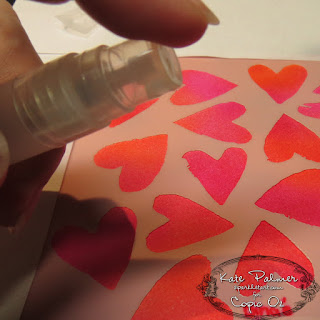
 No need to wait, you can carefully remove your template from the card right now - and you will have a wonderful background with a pattern or design all in coordinating colours.
I'm hoping you have as much fun making these backgrounds as I did and that you have enjoyed my first post for Copic Oz.

Kate Pin It

Thursday, February 14, 2013

Happy Valentines Day!


Happy Valentines day from the team at Copic Oz! Did you get any special surprises?!

Our friends over at X-Press It have a giveaway on their facebook page! They are giving away 100 X-Press It Glue Markers.

Head over to the X-Press It facebook page, like them, share the post with the same photo as above and leave them a comment telling them about what you love about The X-Press It range. 

You have until 11:59 pm AEST on Sunday Feb 17- Sorry, Australian Residents only- one Glue Marker per household.

Pin It

Wednesday, February 6, 2013

Stamping with Copic

Hello Everyone and welcome back to another Copic Oz Tutorial!  Today I'm going to be talking about stamping with Copic.  Many people think that Copics are for colouring images - which is true, but you can achieve other effects by using them direct to rubber!  Please note that I do say Rubber.....not clear or acrylic stamps - these techniques don't work with clear stamps!  Some people think that you can't do direct to rubber with Copics, but that isn't true!!  You just need to know how to use Copics which are alcohol based compared to the waterbased markers which people are more familiar with using on these techniques.

I've taken a BG18 Copic Sketch Marker and applied the ink direct to the rubber sentiment.  The ink WILL dry on the stamp.....this is normal!  :)  This sentiment stamp is from Butterfly Dreams by JustRite Papercraft.

Water based markers need to you 'huff' on them to reactivate the ink, this obviously won't work with Copics because they are alcohol based.  To 'reactivate' the ink on the stamp you need alcohol, so take your Colourless Blender (0) Marker and dampen an area of X-press It Blending Card big enough to stamp your sentiment on.


Stamp your sentiment onto the area dampened with the Colourless Blender!

You can follow the same procedure to make dual coloured sentiments (or use as many colours as you like)!!  This time I've coloured the word 'Happiness' in V09 and the rest of the sentiment with BG18.  Then once again I've dampened some X-press It Blending Card with the Colourless Blender and stamped the sentiment over the top!  The beauty of this technique is you can always make your sentiment the perfect colour match for any project you are making!

There is another way of using the direct to rubber technique!  This time I've taken the butterfly image stamp from the same stamp set and coloured it with R85, Y38 and N7.  Of course, like the sentiment, the ink has dried on the stamp however instead of dampening the card, I've used a Mist It filled with Colourless Blender Refill Ink to spritz it. 

Stamp the spritzed image onto blending card.  This will give you a softer effect much like a watercolour painting instead of the crisp look of the previous technique.

For a bit of fun I've also created the background for my card with a Copic Resist style technique!
Stamp the butterfly in VersaMark ink over a piece of white X-press It Blending Card and heat emboss with Clear Embossing Powder.  Let this cool before the next step.

I've used V09 and BG18 and an airbrush system to airbrush over the butterfly card.  Buff the excess ink off the embossed parts.  If it's a little stubborn, spritz a little Colourless Blender Refill Ink onto a baby wipe (not too much!!) and you'll see the white card show through the clear embossing powder.


Make sure you clean your stamps with Colourless Blender Refill or rubbing alcohol or hand sanitizer to get your stamps nice and clean for the next time you want to try this technique and don't forget to wipe any excess ink off your markers if they've picked up some colour left on the rubber by simply scribbling your markers onto scrap paper.  :) 

Have some fun creating your own background and using your Copics for Direct to Rubber technique and leave a comment here so we can see what you've made!  We'd love to see what you create!

Enjoy!
Kathy  :)

Pin It

Wednesday, January 23, 2013

Happy Australia Day!


Hi there- its Sascha from Copic HQ! There are a lot of sweet tooth's working in our office (I'm one of them!!) and when I saw some yellow and green Liquorice in my local supermarket I felt instantly inspired! I decided to make an Australia Day themed lolly bag, made using my favourite Australian Themed La-La Land Craft's Stamp- Koala Marci.


I coloured my image in with shades of yellow and green  that matched the liquorice. I used a few different techniques to add a bit of life to it. I used my Colourless Blender to add some texture to Marci's koala hat. I just dripped some of my Copic Colourless Blender onto a piece of textured towel, then lightly pressed it onto the areas I wanted to lighten. Click here for a great tutorial on doing this technique. I also used the feather blending technique to colour Marci's tutu. To learn more about this technique, click here! To create they green and gold string to match my image, I simply coloured some plain string in with coordinating colours.


I used the following Copic Colours:
Hair- E00, Y21, Y00
Skin- YR000, YR00
Koala Hat- C1, C3, C5
T-shirt- C1, C3, C5
Tutu- YG11, YG07,Y21, Y02
Ugg Boots- E31, E33, Y21
String- YG07, Y06

Happy Australia Day from everyone at Copic Oz!!Pin It

Wednesday, January 16, 2013

Copic Oz News


We are very excited to announce the appointment of our new Copic DT member, Kate Palmer. Kate is a certified Copic Designer and self confessed Copic addict. Kate is also a very talented and extremely creative and passionate crafter who has been crafting since 1997. She loves anything that sparkles and sharing her art work through her blog. Kate has also taught at various crafting institutions over the years and is looking forward to sharing her tutorials, ideas and Copic knowledge through monthly posts on copicoz.blogspot.com.


We wish Kate a warm welcome to the team and can’t wait to see her Copic creations…coming soon in Feb 2013!

The much loved and super talented Mandi Lee will remain as a guest designer on Copicoz (so stay tuned for her occasional posts) and of course she will continue as our South Eastern Copic Regional Instructor teaching Copic Certifications throughout the year & demonstrating and teaching at the Melbourne & Brisbane Papercraft Expos. She is indeed a super mum, as she will be doing all this whilst embarking on a full time teaching role. We wish her all the best in her new challenge and we are sure that all the kids in her class are super lucky to have a Copic Regional Instructor as their teacher. Good Luck Mandi!Pin It

Wednesday, January 9, 2013

The Colourless Blender!

Hello Everyone!!  I hope you all had a wonderful Christmas (and maybe even received a little Copic goodness from Santa!) and are looking forward to a colourful 2013!!  Today I've got a tutorial about the Colourless Blender!!!  The magic '0' marker has so many applications that I can't possibly show them all in one tutorial, but I hope you enjoy a couple of ideas (and a couple of extra non-Copic ones too!!).

Today I'm using a stamp set called Garden Picks by Flourishes and I thought I'd use those tiny blossoms as a basis for my Fade To White technique.  I'm sure many of you are familiar with the Tip to Tip or Palette technique where you add a dark colour to a light coloured marker and it changes from one colour to the other.  Well this is a take on that idea.
I've scribbled a little BV02 onto some acetate and then used my Colourless Blender to pick the colour up - you'll see the BV02 on the end.
Apply to your image.  The colour will be darker where you start and fade to white as the Colourless Blender doesn't have any colour.  This is perfect for when you are colouring flowers like frangipanis that yellow or pink in the centres and white on the edges.
I've dotted the BV02 in the centres and you can see how the petals are lighter at the ends.  You can make the colours as light or dark as you like and continue to apply until you are happy with the finished result.

IMPORTANT - make sure you scribble off any excess colour on your blender!!  If you don't, the colour will seep down into the reservoir and then your Blender will no longer be colourless! 
The Colourless Blender is also fabulous when you want to lighten your base colour, or you are colouring a large area but want to make sure you don't get any streaking!  In this case, I've 'coloured or primed' the water area of the jar with the Colourless Blender.
I've then flicked in some B000 from each side of the jar.
I've then coloured over the middle of the jar again with the Colourless Blender, which will lighten the middle, push the blue more to the edges giving the effect of translucent water!
A little extra tip for you!  I wanted to close in the jar top around the flowers (this set has 3 mix and match flowers for the jar), so I've used the 0.1 Black Multiliner and drawn in the edge - no-one would ever know!!  ;-)
Now, this would probably be the most used applications for the Colourless Blender!  Fixing Mistakes!!  As you can see I've gone outside the lines with my Y21 marker, which doesn't look so great.
Take your Colourless Blender and place it BEHIND the colour you want to correct.  This is because you are using the Blender to MOVE the colour, not erase it.  I'm a country girl, so I think of it like herding cattle inside a gate, the blender is the cattle dog and you use it to push the colour inside the line!  :)  You can use either the brush end or the chisel end, it's your preference.
Hey presto - the colour is back inside the petal!!  Now a word of warning - this doesn't work with reds or very dark colours!  Those are stubborn and are more likely to move into the area that you've dampened with your blender instead of the other direction making quite a mess!
Another great tip for when you are doing water - use the X-press It Clear Gel Glue to go over your finished work!  (Don't ever colour onto the glue, this is the last step.)  The Clear Gel Glue will give your water dimension and shimmer......just don't forget to let it dry really well!!  You can also use your blender to create pebbles under your jar - you can find that tutorial HERE.
Finish creating your card!!

Copic Colours used today......
Hyacinths - BV02, Blender, N1 (shadow areas)
Small Blossom - R000, R12, R14
Zinnia - RV000, RV32, RV34, E51, E53, E55
Yellow Flower - Y21, Y35, Y38, YR16, YR18, E55
White Blossom - E51
'Glow' - BG0000
Pebbles - N1, Y21, G82
Stems - G40, G43, G46, G82, G85

Thanks for popping by and I hope you've enjoyed today's tutorial!!  Why not have a go at some of these techniques and tips and leave a link in the comments below!  We'd love to see what you create!!

Happy Colouring!
Kathy

Pin It

Monday, January 7, 2013

Do you look good in a Crown?

Happy New Year to all Copic Fans, we hope you had a marker filled Festive Season and have some colour filled days ahead in 2013!!

We are looking for one said colour-er to be crowned the Queen of Copic and win a share of over $400 in prizes... all the details on how to enter can be found on the Competitions page at www.copicmarker.com.au!!

We are really looking forward to seeing your cards, layouts or OTP projects, all you need do is use your favourite Copic colours and send your projects and Entry Form in by February 25, 2013.

We hope you will join us, and it may just be you that is wearing the crown after the winner is announced at the Melbourne Scrapbook and Papercraft Expo.

Good Luck and Happy Colouring!!


Pin It